ModBus
ModBus implementation sur ESP32/ESP8266
Projet:
Un appareil modbus (E-MM120m) doit être interrogé et les valeurs lues doivent être mise a la disposition d’un utilisateur n’ayant pas d’accès direct à l’appareil, le WiFi est disponible mais ne peut être configuré pour donner accès.
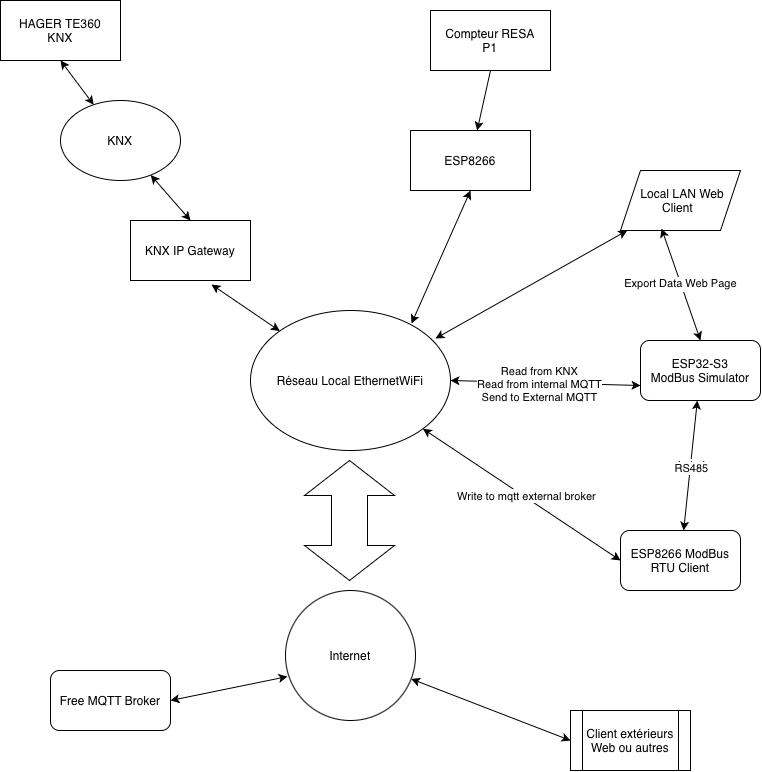
Simulateur (Modbus Slave/Server)
Cet equipement est destiné a émuler l’appareil modbus, il va donc se connceter en mqtt pour obtenir une lecture de la tension du réseau électrique et mettre celle-ci à disposition sur un bus RS485 au format modbus.
Matériel:
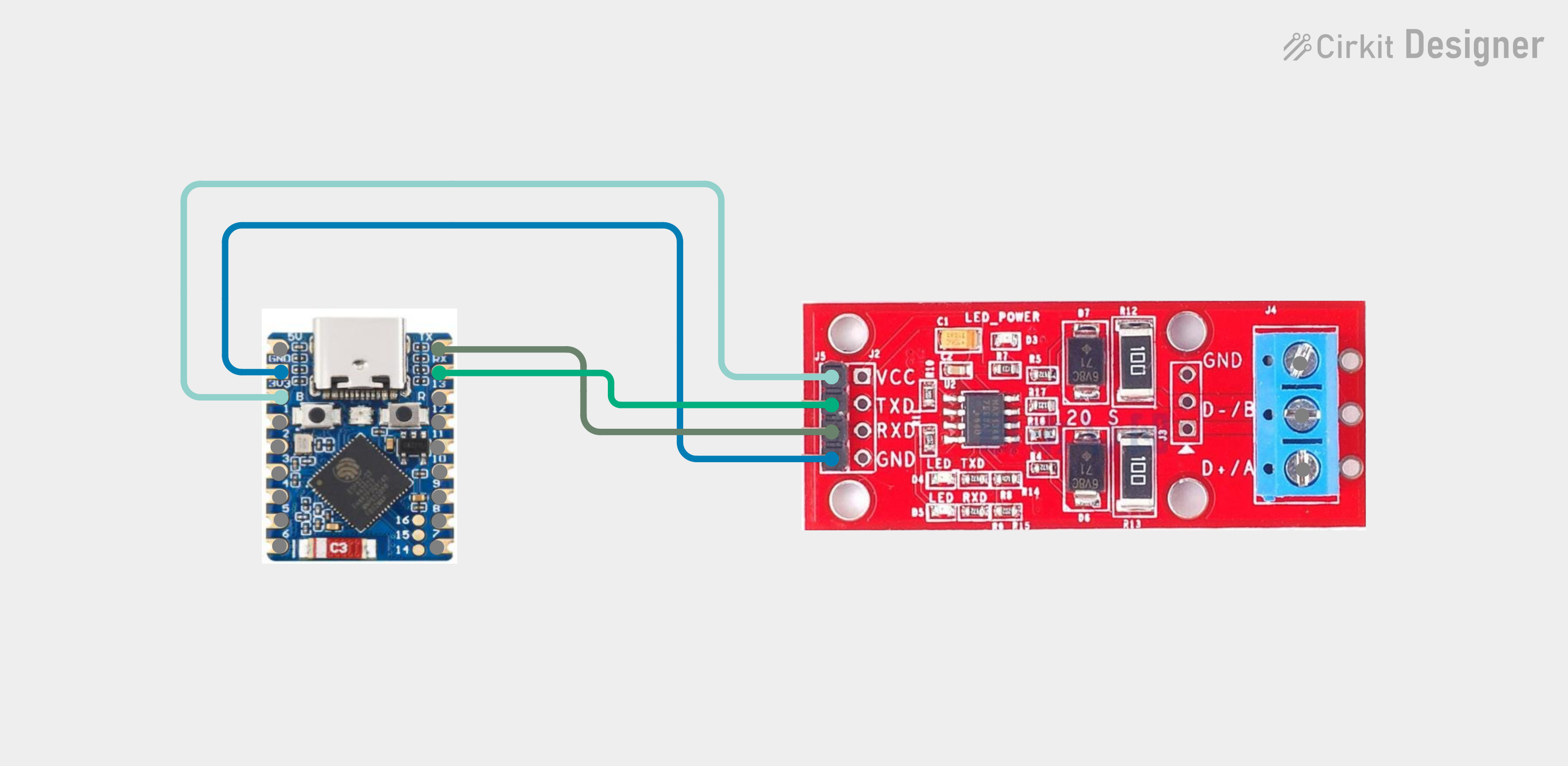
- ESP32-S3
- convertisseur TTL/RS485
Coût une dizaine d’euros.
Câblage:
Client
Le client est lui basé sur un ESP8266 (Weemos D1 mini)
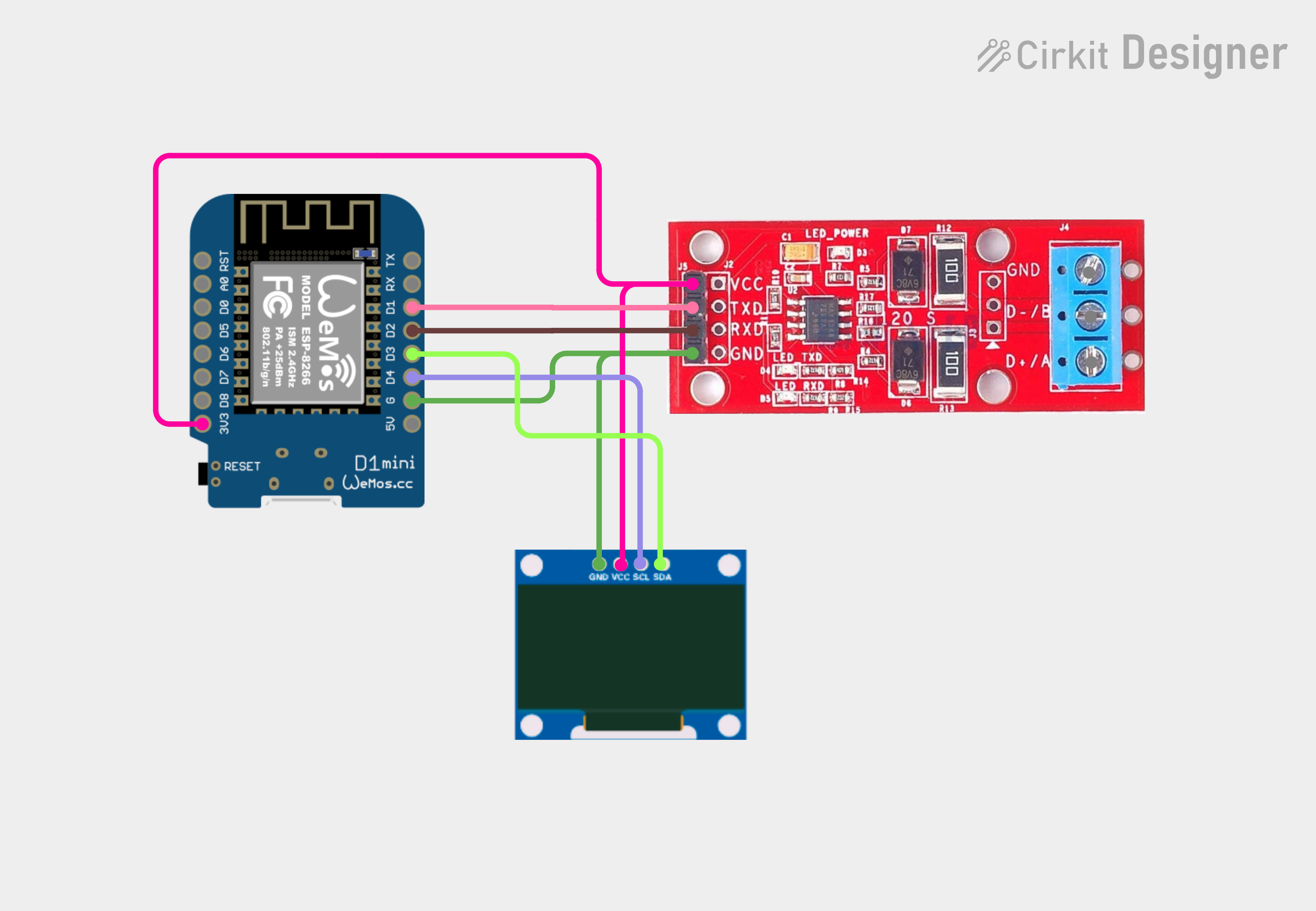
Ensuite on raccorde les deux convertisseurs RS485 ensemble via D+ et D-
Voiçi ce que cela donne après avoir mis les firmwares:
On ne va pas détailler le firmware du simulateur
Le simulateur n’a d’intérêt quepour générer des données au format voulu (emulation de l’équipement réel que je n’ai pas). Il est un tant soit peu plus compliqué car il nécessite
. Connexion WiFi
. Connexion KNX + callback and floating point convertion of big endian dpt14.56
. Connexion mqtt (publish)
. Connexion modbus (reply to request little endian)
Firmware Arduino IDE ESP8266 D1 Mini (Weemos)
Les messages imprimés via Serial.print sur la console peuvent être enlevés (debug statements) Attention il faudra adpater les numéro des registres à l’appareil Slave/server modbus
Pseudo code:
- Initialisation
    - Wifi
    - setup mqtt broker info and client callback
    - connect to broker
    - subscribe to the relevant topics (in case we'd like to command from outside)
    - setup Modbus connection on UART
- main loop call for HoldRegisters on modbus, publish the responses on the proper mqtt topic
Code
    #define RXPIN 0 //D3 GPIO0
    #define TXPIN 2 //D4 GPIO2
    #define BAUDS 9600
    #include <ModbusRTU.h>
    #include <ESP8266WiFi.h>
    #include <PubSubClient.h>
    #include <Wire.h>
    #include <U8g2lib.h>

    // WiFi settings
    const char *ssid = "Malperthuis";             // Replace with your WiFi name
    const char *password = "9725145239910203";   // Replace with your WiFi password

    // MQTT Broker settings
    const char *mqtt_broker = "broker.emqx.io";  // EMQX broker endpoint
    const char *mqtt_topic = "emqx/D1minimodbus";  // MQTT topic
    const char *mqtt_username = "emqx";  // MQTT username for authentication
    const char *mqtt_password = "public";  // MQTT password for authentication
    const int mqtt_port = 1883;  // MQTT port (TCP)
    WiFiClient espClient;
    PubSubClient mqtt_client(espClient);

    //OLED display
    #define SCREEN_WIDTH 128
    #define SCREEN_HEIGHT 64
    #define I2C_ADDRESS   0x3C  // Replace with the correct I2C address
    U8G2_SH1106_128X64_NONAME_F_HW_I2C Oled(U8G2_R0, /* reset=*/ U8X8_PIN_NONE);

    #define yvolt 30
    #define yamp  40
    #define ypow  50

    // UART communication for MODBUS
    #if defined(ESP8266)
    #include <SoftwareSerial.h>
    // SoftwareSerial S(D1, D2, false, 256);

    // receivePin, transmitPin, inverse_logic, bufSize, isrBufSize
    // connect RX to D2 (GPIO4, Arduino pin 4), TX to D1 (GPIO5, Arduino pin 4)
    SoftwareSerial S(RXPIN, TXPIN);
    #endif

    ModbusRTU mb;

    bool cbWrite(Modbus::ResultCode event, uint16_t transactionId, void* data) {
    #ifdef ESP8266
    Serial.printf_P("Request result: 0x%02X, Mem: %d\n", event, ESP.getFreeHeap());
    #elif ESP32
    Serial.printf_P("Request result: 0x%02X, Mem: %d\n", event, ESP.getFreeHeap());
    #else
    Serial.print("Request result: 0x");
    Serial.print(event, HEX);
    #endif
    return true;
    }

    void connectToWiFi() {
        WiFi.begin(ssid, password);
        Serial.print("Connecting to WiFi");
        while (WiFi.status() != WL_CONNECTED) {
            delay(500);
            Serial.print(".");
        }
        Serial.println("\nConnected to the WiFi network");
    }

    void connectToMQTTBroker() {
        while (!mqtt_client.connected()) {
            String client_id = "esp8266-modbusclient-" + String(WiFi.macAddress());
            Serial.printf("Connecting to MQTT Broker as %s.....\n", client_id.c_str());
            if (mqtt_client.connect(client_id.c_str(), mqtt_username, mqtt_password)) {
                Serial.println("Connected to MQTT broker");
                mqtt_client.subscribe(mqtt_topic);
                // Publish message upon successful connection

                mqtt_client.publish(mqtt_topic, "Connecting");
            } else {
                Serial.print("Failed to connect to MQTT broker, rc=");
                Serial.print(mqtt_client.state());
                Serial.println(" try again in 5 seconds");
                delay(5000);
            }
        }
    }

    void setup() {
    Serial.begin(115200);
    Oled.begin();

    Oled.clearBuffer();
    Oled.setDrawColor(1);
    Oled.setFontMode(0);
    Oled.setFont(u8g2_font_8x13_tf);  // Set font
    Oled.drawStr(0,20,"ModBus");  // Draw the string
    Oled.drawStr(1,yvolt,"Volts:");
    Oled.drawStr(0,ypow,"Power:");
    Oled.drawStr(0,yamp,"Amps:");
    //Oled.sendBuffer();  // Send the buffer to the display

    Serial.println("Starting");
    connectToWiFi();
    mqtt_client.setServer(mqtt_broker, mqtt_port);
    mqtt_client.setCallback(mqttCallback);
    connectToMQTTBroker();
    #if defined(ESP8266)
    S.begin(BAUDS, SWSERIAL_8N1);
    mb.begin(&S);
    #elif defined(ESP32)
    Serial1.begin(BAUDS, SERIAL_8N1);
    mb.begin(&Serial1);
    #else
    Serial1.begin(BAUDS, SERIAL_8N1);
    mb.begin(&Serial1);
    mb.setBaudrate(BAUDS);
    #endif
    mb.master();
    }

    float tofloat(uint16_t *a) {
    union {
        float x;
        byte xA[4];  //little endianess
        uint16_t xB[2];
    } data;

    data.xB[0] = a[0];
    data.xB[1] = a[1];
    Serial.print("Converted: ");
    Serial.println(data.x);
    return data.x;
    }

    void mqttCallback(char *topic, byte *payload, unsigned int length) {
        Serial.print("Message received on topic: ");
        Serial.println(topic);
        Serial.print("Message:");
        for (unsigned int i = 0; i < length; i++) {
            Serial.print((char) payload[i]);
        }
        Serial.println();
        Serial.println("-----------------------");
    }

    void loop() {
    uint16_t sladd = 1;
    uint16_t offset = 0;
    uint16_t poweroff = 2;
    uint16_t value[6];
    uint16_t numregs = 6;
    uint16_t voltage[2];
    uint16_t power[2];
    uint16_t curent[2];
    float fvolts;
    float fpower;
    float fcurent;
    if (!mqtt_client.connected()) {
        connectToMQTTBroker();
    }
    mqtt_client.loop();

    //  if (!mb.slave()) {
    //    mb.readCoil(1, 1, coils, 20, cbWrite);
    //  }
    if (!mb.slave()) {
    mb.readHreg(1, 0, value, 6,cbWrite);  //use.readIreg for Input Registers
    while(mb.slave()) { // Check if transaction is active
        mb.task();
        delay(10);
        }

            // Successfully read holding register
            mqtt_topic="emqx/D1minimodbus/volts";
            Serial.print("Holding Register Value: ");
            Serial.print(value[0],HEX);
            Serial.print(" ");
            Serial.print(value[1],HEX);
            Serial.print("  ");
            Serial.print(value[2],HEX);
            Serial.print("  ");
            Serial.print(value[3],HEX);
            Serial.print("  ");
            Serial.print(value[4],HEX);
            Serial.print("  ");
            Serial.print(value[5],HEX);
            Serial.print("  ");
            voltage[0]=value[0];
            voltage[1]=value[1];
            fvolts = tofloat(voltage);
            mqtt_client.publish(mqtt_topic, String(fvolts).c_str());
            Oled.setDrawColor(0);
            Oled.drawBox(64,yvolt-10,64,20);
            Oled.setDrawColor(1);
            Oled.drawStr(64,yvolt,String(fvolts).c_str());
            power[0]=value[2];
            power[1]=value[3];
            fpower = tofloat(power);
            Oled.setDrawColor(0);
            Oled.drawBox(64,ypow-10,64,20);
            Oled.setDrawColor(1);
            Oled.drawStr(64,ypow,String(fpower).c_str());
            mqtt_topic="emqx/D1minimodbus/power";
            mqtt_client.publish(mqtt_topic, String(fpower).c_str());
            Oled.sendBuffer();
            curent[0]=value[4];
            curent[1]=value[5];
            fcurent = tofloat(curent);
            Oled.setDrawColor(0);
            Oled.drawBox(64,yamp-10,64,20);
            Oled.setDrawColor(1);
            Oled.drawStr(64,yamp,String(fcurent).c_str());
            mqtt_topic="emqx/D1minimodbus/current";
            mqtt_client.publish(mqtt_topic, String(fcurent).c_str());
            Oled.sendBuffer();
            mb.task();
    }

    delay(1000);

    mb.task();
    yield();
    }