FHEM notes
This page provides some tricks and tips for FHEM.
MQTT
Module MQTT seems to generate protocol errors at mosquitto broker level, looping connection/disconnection, as a result FHEM gets delayed while establishing the connection.
Using the MQTT2 module.
First of all an MQTT client has to be defined, this client will connect the mqtt broker (e.g. mosquitto,internal MQTT2_SERVER within FHEM, an mqtt broker in a homeassistant instance …)
Syntax
define <name> MQTT2_CLIENT <host>:<port>
is the fhem device name, eg myBroker : the host IP/DNS name and mqtt port number
In the device sevral attributes can be setup, the usual ones are:
- authentication can be setup using the attribute username then using set
password where password is the mqtt password, it will then be stored encoded. - clientid the ID of the client, identifying the client wihin the broker, each client admits one broker connexion
- subscriptions the topic subscribed by the client these need to be defined for t be used by the MQTT2_DEVICEs
MQTT messages turned into FHEM devices using MQTT2_DEVICE
Syntax
define <name> MQTT2_DEVICE [clientId]
is the fhem device name, eg myDevice - [clientId] is the client ID to be used, if set, this will direct the requests to the proper MQTT2_CLIENT
Lets see for example a zigbee tuya triple switch controlled by zigbee2mqtt, z2m send the message 14:19:59.068 RCVD zigbee2mqtt/0xa4c138deafd88354 {“countdown_l1”:0,“countdown_l2”:0,“countdown_l3”:0,“indicator_mode”:null,“linkquality”:153,“power_on_behavior”:“off”,“power_on_behavior_l1”:“off”,“state_l1”:“ON”,“state_l2”:“OFF”,“state_l3”:“OFF”,“switch_type”:“toggle”}
How can we implement a single device piloting the 3 switches in FHEM
define zigbee_0xa4c138deafd88354 MQTT2_DEVICE
attr zigbee_0xa4c138deafd88354 alias TUYA_TS0003
attr zigbee_0xa4c138deafd88354 devStateIcon 1.ON:on:set1+off 1.OFF:off:set1+on 2.ON:on:set2+off 2.OFF:off:set2+on 3.ON:on:set3+off 3.OFF:off:set3+on
attr zigbee_0xa4c138deafd88354 readingList myBroker:zigbee2mqtt/0xa4c138deafd88354:.* { json2nameValue($EVENT) }
attr zigbee_0xa4c138deafd88354 room MQTT2_DEVICE
attr zigbee_0xa4c138deafd88354 setList set1 { $NAME =~ /zigbee_(.*)/;;;;return qq(zigbee2mqtt/$1/set {"state_l1":"$EVTPART1"}) }\
    set2 { $NAME =~ /zigbee_(.*)/;;;;return qq(zigbee2mqtt/$1/set {"state_l2":"$EVTPART1"}) }\
    set3 { $NAME =~ /zigbee_(.*)/;;;;return qq(zigbee2mqtt/$1/set {"state_l3":"$EVTPART1"}) }\
    switch_type:toggle,state,momentary {$EVTPART1 =~ s/\./,/g;;;;$NAME =~ /zigbee_(.*)/;;;;return qq(zigbee2mqtt/$1/set {"$EVTPART0":"$EVTPART1"}) }
attr zigbee_0xa4c138deafd88354 stateFormat 1:state_l1\
    2:state_l2\
    3:state_l3\
- the device name is zigbee_0xa4c138deafd88354 (actually picked up from the z2m name)
- alias is a human readable name
- devstateIcon an icon representing the state of the device, in this cas ewe have 3 light bulbs, one for each relay circuit
- readinglist the readings definition, the mqtt message holding a json with the switch values, we use myBroker:zigbee2mqtt/0xa4c138deafd88354:.* the message that we are interested in and { json2nameValue($EVENT) } that return a reading’s name with its value, translated from the json message received in the topic zigbee2mqtt/0xa4c138deafd88354
- setlist will publish. a message corresponding to the set command, set1 { $NAME =~ /zigbee_(.*)/;;;;return qq(zigbee2mqtt/$1/set {“state_l1”:"$EVTPART1"}) }
- $NAME =~ /zigbee_(.*)/ will put the device id <0xa4c138deafd88354> in $1
- return qq(zigbee2mqtt/$1/set {“state_l1”:"$EVTPART1"}) will return a json value to be set in the published message, this value is set by clicking on the device icon eg zigbee2mqtt/0xa4c138deafd88354/set {state_l1":“on”}
- switch_type defines the type of switch
- stateformat set the displayed format state_l1 is the relay siwtch 1 reading, which in turns drives the icon displayed
Which gives:
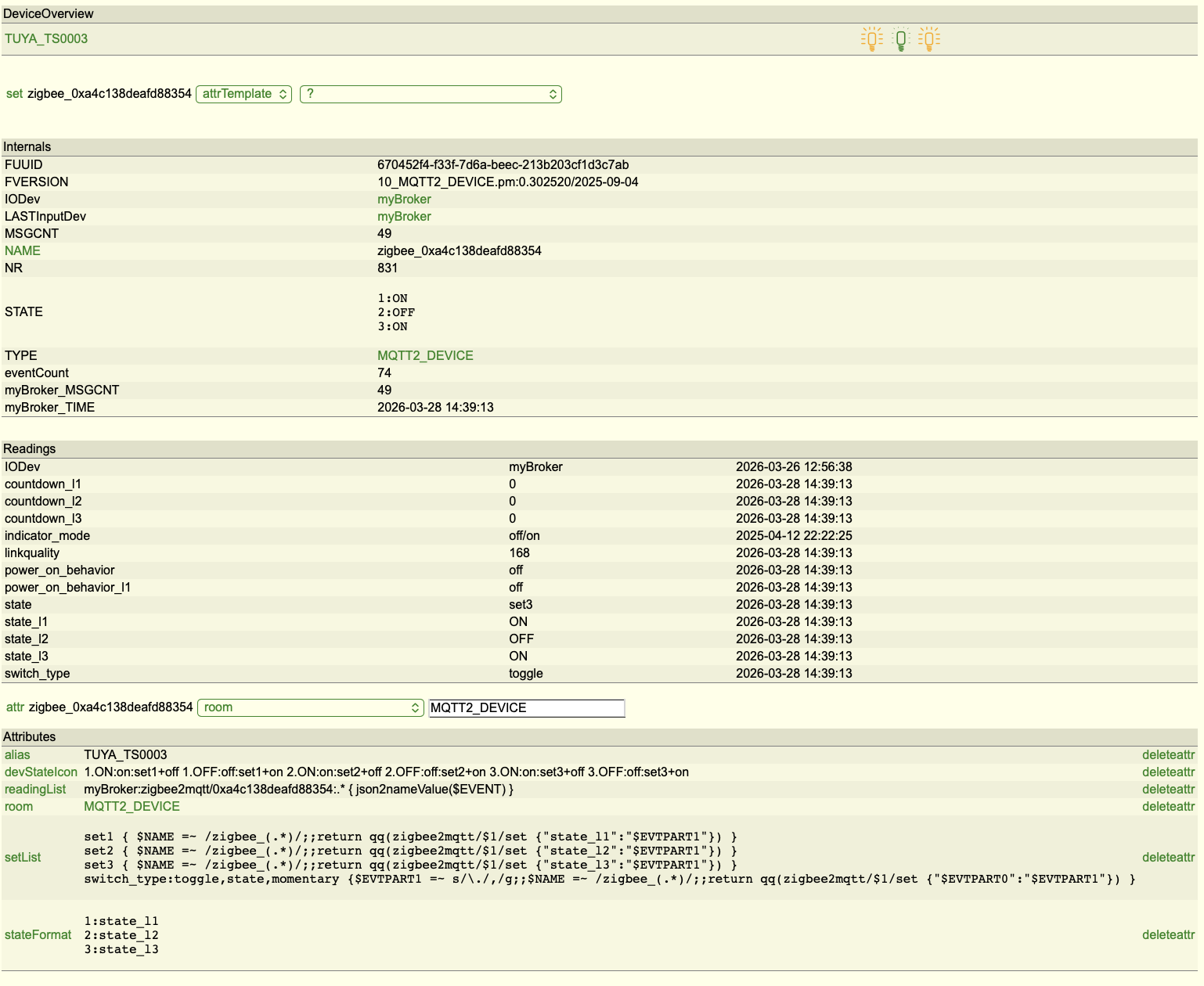
I have a few esp devices that send topics on their own, as a result on FHEM must have one device per topic. To circumvent the problem, a signel device can be created and the subtopic values can be stored in the device’s readings
Example:
A Smart meter deice that sends the reading on subtopics of sensors/power/p1meter/
The MQTT2 broker has to subscribe to sensors/power/p1meter/#
The mosquitto broker running on the fhem machine and subscribing topics:
-
sensor/PIR2/#
-
nucpc_plug/# sma/solar/#
-
sensors/power/p1meter/#
-
room is a page in the fhem GUI
define myBroker MQTT2_CLIENT 127.0.0.1:1883 attr myBroker clientId myBroker attr myBroker clientOrder MQTT_GENERIC_BRIDGE MQTT2_DEVICE attr myBroker icon mqtt attr myBroker lwt system/raspdomo/connection/status connection lost attr myBroker lwtRetain 1 attr myBroker room MQTT attr myBroker subscriptions sensor/PIR2/# nucpc_plug/# sma/solar/# sensors/power/p1meter/# attr myBroker username jcoenen
The devices corresponding to the subscribed topics
define P1meter MQTT2_DEVICE
attr P1meter readingList sensors/power/p1meter/[^:]+:.* { my @toptree=split('/',$TOPIC);; return {$toptree[$#toptree] => $EVENT} }

define PIR_Bureau MQTT2_DEVICE
setuuid PIR_Bureau 69bfe863-f33f-7d6a-7323-f72cf14ea6e1a18f
attr PIR_Bureau disable 0
attr PIR_Bureau readingList sensor/PIR2/[^:]+:.* { my @toptree=split('/',$TOPIC);;;; return {$toptree[$#toptree] => $EVENT} }\
sensor/PIR2/[^:]+:.* { return {event => $TOPIC}}
attr PIR_Bureau room Bureau,MQTT2_DEVICE
attr PIR_Bureau stateFormat motion

define SMAsolar MQTT2_DEVICE
setuuid SMAsolar 69bfe94e-f33f-7d6a-23ab-6416b97f260c885a
attr SMAsolar disable 0
attr SMAsolar readingList sma/solar/[^:]+:.* { my @toptree=split('/',$TOPIC);;;; return {$toptree[$#toptree] => $EVENT} }
attr SMAsolar room MQTT2_DEVICE,Photovoltaïque,Power
attr SMAsolar stateFormat instant_ac (Watts)
This is a obk firmare that generates subtopics with more layers like this
nucpc_plug
connected = online
temp = 0.00
ssid = Malperthuis
power
    get = 19.50
sockets = 2
rssi = -50
voltage
    get = 251.5
current
    get = 0.142
power_apparent
    get = 35.79
uptime = 1608812
power_reactive
    get = 30.93
power_factor
    get = 0.54
ip = 192.168.1.242
so for example the power will be on nucpc_plug/power/get
To generate the reading power an additional test miusr be performed in the perl code.
define nucpc_plug MQTT2_DEVICE
setuuid nucpc_plug 69bff250-f33f-7d6a-2330-33645447a8605029
attr nucpc_plug disable 0
attr nucpc_plug eventMap { dev=>{ 'on'=>'1', 'off'=>'0' } }
attr nucpc_plug readingList nucpc_plug[^:]+:.* { my @toptree=split('/',$TOPIC);;;; if ($toptree[$#toptree] eq "get") { return {$toptree[@toptree-2] => $EVENT}} else {return {$toptree[$#toptree] => $EVENT}}}
attr nucpc_plug room Bureau,Computers,MQTT2_DEVICE
attr nucpc_plug setList on nucpc_plug/switch 1\
off nucpc_plug/switch 0
When a topic is returned that holds a json formatted string, to put the values of the json in the device readings like this:
attr Meteo readingList myBroker:on4kch/meteo/speed:.* { json2nameValue($EVENT) }
KNX
To interface with knx, FHEM uses the module KNXIO which replaces the TUL module.
KNXIO can connect the KNX Bus via TCP/IP or unix socket, the documentation states
define
- H Host Mode - connect to a KNX-router with UDP point-point protocol. This is the mode also used by ETS when you specify KNXNET/IP as protocol. You do not need a KNXD installation. The protocol is complex and timing critical! If you have delays in FHEM processing close to 1 sec, the protocol may disconnect. It should recover automatically, however KNX-messages could have been lost! The benefit of this protocol: every sent and received msg has to be acknowledged within 1 second by the communication partner, msg delivery is verified!
- M Multicast mode - connect to KNXD’s or KNX-router’s multicast-tree. This is the mode also used by ETS when you specify KNXNET/IP Routing as protocol. If you have a KNX-router that supports multicast, you do not need a KNXD installation. Default address:port is 224.0.23.12:3671 Pls. ensure that you have only one GW/KNXD in your LAN that feed the multicast tree! If you run FHEM in Docker, note that multicast is not supported in network-mode bridge, but macvlan supports multicast.
- T TCP mode - uses a TCP-connection to KNXD (default port: 6720). This mode is the successor of the TUL-modul, but does not support direct Serial/USB connection to a TPUart-USB Stick. If you want to use a TPUart-USB Stick or any other serial KNX-GW, connect the USB-Stick to KNXD and use modes M,S or T to connect to KNXD.
- S Socket mode - communicate via KNXD’s UNIX-socket on localhost. default Socket-path: /var/run/knx or /run/knx depending on knxd’s installation
Path might be different, depending on knxd-version or -config specification! This mode is tested ok with KNXD version 0.14.30. It does NOT work with ver. 0.10.0! If you run FHEM and KNXD in Docker, this is the preferred mode to run both in network-mode bridge - see wiki!. - X Special mode - for details see KNXIO-wiki!
ip-address:port or hostname:port Hostname is supported for mode H and T. Port definition is mandatory.
phy-address The physical address is used as the source address of messages sent to KNX network. Valid range: <0-15.0-15.0-255>. 15.15.255 should not be used, is used as mfg-default for “non-configured”. This address should be one of the defined client pool-addresses of KNXD (-E parameter) or Router.
All parameters are mandatory. Pls. ensure that you only have one path between your KNX-Installation and FHEM! Do not define multiple KNXIO- or KNXTUL- or TUL-definitions at the same time. Examples:
- define myKNXGW KNXIO H 192.168.1.201:3671 0.0.51
- define myKNXGW KNXIO M 224.0.23.12:3671 0.0.51
- define myKNXGW KNXIO S /var/run/knx 0.0.51
- define myKNXGW KNXIO T 192.168.1.200:6720 0.0.51
Suggested parameters for KNXD (Version >= 0.14.30), with systemd:
- KNXD_OPTS="-e 0.0.50 -E 0.0.51:8 -D -T -S -b ip:" # knxd acts as multicast client - do NOT use -R !
- KNXD_OPTS="-e 0.0.50 -E 0.0.51:8 -D -T -R -S -b ipt:192.168.xx.yy" # connect to a knx-router with ip-addr
- KNXD_OPTS="-e 0.0.50 -E 0.0.51:8 -D -T -R -S -single -b tpuarts:/dev/ttyxxx" # connect to a serial/USB KNX GW
The -e and -E parameters must match the definitions in the KNX-router (set by ETS)!